Text treatment
Transcript
00:00
- [Rik] We're gonna assume that Aria loves the colors. So we're gonna move this from Awaiting Approval into Completed. So the next thing that we're gonna work on of course is the Type treatment. Again Type treatment, what does that even mean? So what is the general kind of look and feel of his type. So we have some copy that we can use. How does that actually look on the website, and also has does it look in a logo as well.
00:22
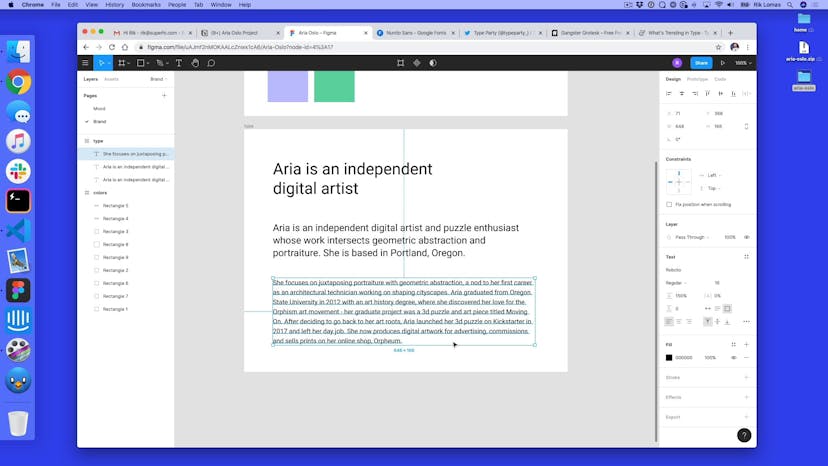
So what we can do is we're gonna go back to our figma file, and we're gonna make a brand new output. So we've got our colors here, and maybe underneath I'm gonna create a new frame, so I'm gonna click the frame icon and underneath here, I'm just gonna add a new one, so here we go, maybe I'll make it quite big, there we go, maybe 800 by 600, nice. So we do have some copy that we can use, and again how we do this is I'm gonna click the text icon, I'm just gonna make this area pretty big, something like that for now, and again at the moment it's pretty big from previously, so in my Aria Oslo folder, which is in my downloads, I've got my About.text, I'm just gonna open this up in a text, and this can be anything you want, it's a text file, and I'm just gonna take this tag line up here, and I'm not gonna use all of this for now, I'm just gonna use the first few words, 'cause I want two levels of heading.
01:16
I want the kind of like big one that I'm gonna use in the Logo, I want a medium one that I'm gonna use on the website, and then a general kind of a body copy one. So, there's gonna be three different text sizes. So we have to take "Aria is an independent digital artist", and that's it. So I'm gonna copy that, and paste it in here. So currently, it's way too big. For now what we're gonna do is select all of this, and we're just gonna reduce the size to something like 38 for now, and that kind of works okay.
01:44
The next thing we're gonna do is make a different text size, so again I'm just gonna copy, I'm gonna take this, and underneath I'm gonna make another one, and for this one I'm gonna take the whole tag line, so this is the middle one, I'm gonna paste this in. Now again this is a little bit too big, so I'm gonna select all of this again, and just reduce it in height, so maybe something like 24, that kind of works for me.
02:07
And then the last one, as we want this kind of a paragraph style, so again I've not really done any kind of typing treatments to this I'm just setting this up, so I'm gonna take this text box, and I'm gonna make it below, and I'm just gonna take maybe this paragraph in the middle, I'm gonna copy that and paste in here, again a little bit too big, so I'm gonna reduce it down to 18, maybe be 14, even smaller.
02:30
So this is kinda of a basic type treatment. I'm just gonna align these up, just on the left side for now. The next thing I wanna do is just change it's frame names and those colors and type. So I got this as a type, I got this as colors, I know which is which. So how do I go about picking which type face, and which type sizes. Now one thing I like to start with is from the bottom upwards, and the reason for that is this will inform the other things.
02:55
So this is kind of like the base layer that I'm gonna use to build on top of. So here what the first thing I'm gonna do is actually work on the text size. So 14 by default is what we put, is a little bit small for the white bit, it feels a little bit hard to read, so I want this to be a bit more readable. So what I'm gonna do is I'll just actually increase this a little bit. So rather than 14, how does 15 look, looks a little bit better, maybe even something like 16, that feels a little bit more easy to read.
03:24
Now with this as well, I've got these different options I can change how, if it's regular to bold, I can change the font, I'll talk about that in a minute, I'm gonna keep the fill as black, because let's not worry about any of that for now, we gonna combine that a little later, and in here I can change things like the line-height. So for default I can say, you know if I twist, I change this up and down, you can see these lines between each one getting further apart.
03:50
So for something like this, you know I can kind of do it by eye, something that's a bit more readable, is something like 130 to 150%, I'm just gonna do it as 150% for now, 'cause that feels quite readable, it feels quite open and quite modern and clean. Now the more area you have to read, then generally the cleaner it looks, it's just kind of like a visual thing. So for now that kinda feels pretty good for me.
04:18
We're not really worried about the Roboto which is the default one in here. For now we're just gonna say this is the right size and the right spacing between things. We'll kind of tweak that a little later. So once we got a 16, how about the next one? So 24 and 16 kind of works well together, because this is a 150 of this, 150% of this. So I just basically multiplied this in 1.5.
04:45
So things like 1.5 is a nice round number to actually multiply by. So if I wanna pick another text size, maybe 16, if I wanna double that, this will be 32. So this could be something like 32 up here, so I'm just gonna do 32 for now. What these kind of numbers do is almost like have a ratio, of kinda mathematical ratio between everything. So by adding this kind of mathematical ratio in between my text sizes, this naturally for my eye feels quite readable.
05:16
I'm not just picking things for the sake of it, I'm doing it because of math. So, 24 is actually pretty good as a size set, maybe I wanna increase the size in between the lines again, you know as it's a text size, maybe something like 130%, maybe something like that, see how that looks, you know it's not quite as high as this which is 150, because the lines are bigger, so it's a little bit, you know it feels bigger, even if this is a lot smaller of a number.
05:45
So again I'm gonna use this idea on here, so I got 16, so maybe 32 feels a bit small, maybe I wanna do two and a half times 16, again I can just quickly do this in Spotlight, I'm just gonna do 16 times 2.5, 40, that feels quite good, let's try 40 in here, not just picking random numbers, boy it looks pretty good. And again if I just wanna make this a little bit short, it's gone to two lines, that kind of feels quite good, to getting what is that? Auto, what is auto? Don't know, I have to actually put something in 120, maybe try that 120%, see that feels quite good.
06:23
So I've done my kind of text treatment, I've kind of really worked on the spacing and the sizes of the font I had, I've not really done anything about the text treatment. So in the next video what we're gonna do is talk about which fonts to use as part of this.
SuperHi FM
Want some ambient music in the background? Play our radio station!