Confidence
Transcript
00:00
(pensive music) - Let's talk about your confidence as a presenter, or should we say like your comfort level presenting. I think a lot of people experience issues with public speaking and have a fear of public speaking. I think it's important to ask yourself one level deeper. Why is it that you have a fear of public speaking? And I think it comes down to, at least for me, feeling a fear of judgment from others. What other people are gonna think about me. I am standing here as an area expert for my presentation topic.
00:39
I don't want someone else in the audience, I'm, you know, I'm concerned that they feel more expertise there or that they know better about that subject. So that's a fear that I have. It's what makes public speaking scary for me. I don't want to claim to be an authority of public speaking and confidence. I don't think I'm the best at it, but I think that I've learned tips over the years of giving presentations and coaching other people that give presentations that I've just picked up some tips, so I wanna share them with you.
01:15
I think it's important to have a level of confidence to be persuasive because when you are more comfortable in your own skin, as a presenter, when you're more comfortable on stage in front of your audience, your audience will feel more comfortable too. And when your audience is more comfortable, they'll be more willing to accept what you have to say. And so we wanna be persuasive with our presentations. That's the name of this course. We want our audience to be comfortable so that they're willing to engage with our ideas, to have those emotionally intense moments, to have participation, to remember what we said.
01:53
All those things are tied to confidence and your public speaking skills and how you carry yourself. So what are some ways that you can build confidence and your own public speaking skills? Well, I think the most important one is to rehearse. Rehearsing is not something that should be skipped if possible in your process. Generally, not enough time is ever made for the presentation creation. Oftentimes it's, oh, I need a presentation to speak tomorrow or to convince someone of this idea next week.
02:31
Generally the presentation timelines are very short. I know because I run a business that makes presentations and our clients always come to us with something they needed weeks ago. It's often the case. So we've talked about the importance of like storytelling and it's so great to start before you start building slides, making time for the storytelling and the rehearsing, the things outside of the slide tool are incredibly important. One thing rehearsing does is it gives you a chance to feel more comfortable with your presentation.
03:03
It also gives you a chance to review and edit. So every time that you rehearse, you can take down notes of, oh, maybe the design's not consistent through this part. You'll notice something you hadn't noticed before. Some of the ways that you can rehearse is you can record a video, I often do that. At first, a lot of people will talk about the idea of hearing yourself talk and hating the way you sound. I would say that exposure therapy works here. Just listen to yourself over and over again. You very quickly become very comfortable with the way that you sound recorded.
03:44
That's not a long-term problem. You will get used to it and it will not bother you after time. So you can record yourself. What's really great about that is that you can watch your body language. You can pause it to take notes. You can edit your presentation as you're watching it, you know, pausing and editing, and so there's something really nice about the recording process.
04:06
Gives you a chance to just be with yourself. But I also recommend rehearsing with somebody else to find a trusted friend or a colleague and rehearse your presentation. What's gonna happen then is you're gonna get feedback and feedback can be really helpful. They will see something that you didn't necessarily see when watching it back yourself. If it's a coworker, that colleague of yours can know more about the project, maybe, if this is a work related presentation.
04:35
I mentioned in a previous lesson that I wanted to run my presentation by one of my teammates to help me figure out that last line. You start collaborating. This is where partnership comes into play. If it's a trusted friend, that person knows you personally. They're gonna be able to catch when your personality's not really showing through. We were talking earlier about that opening section of your presentation to make it more memorable, having it set the tone, having your personality shine through, your friends will know if you're doing that or not, and will have the opportunity to give you that feedback and will be able to reflect back to you.
05:14
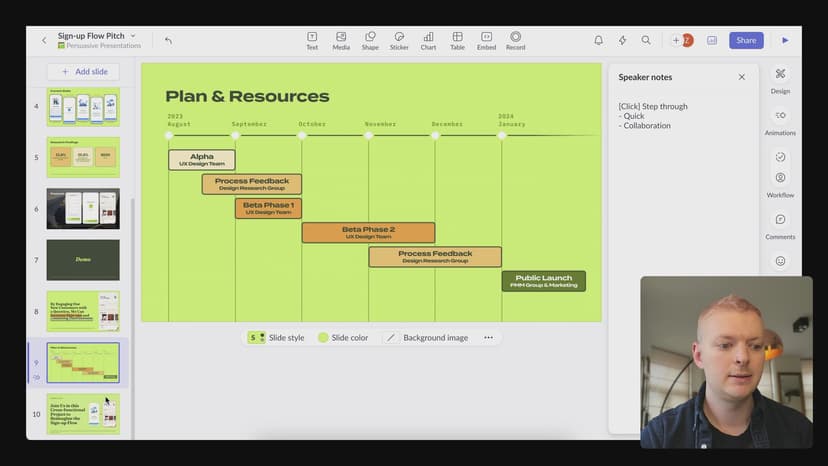
So rehearsing can be really helpful. It's also a great way to do the design review stage, the story review stage, the copy editing stage going through and rehearsing gives you the opportunity to check all of these things we've talked about previously. Make all those edits as you go or write your talk track in presenter's notes. Speaking of presenter's notes, one of the things you're gonna do when you public speak is you might have presenter's notes for your slides. All of these slide tools have speakers notes, a section to put those and they all have a speaker view.
05:52
It's a specific screen that comes up when you're presenting that gives you the opportunity to see your notes and maybe the next slide that's coming up, maybe a timer or the current time. These are customizable screens in most apps. So there's a lot of opportunities for you to make these for yourself. If you're presenting on a stage, especially a venue that's used to having presentations, luckily a lot of them have downstage monitors, or these monitors are called confidence monitors, specifically because they help the presenters feel more confident.
06:28
And what they do is they just display either the slide so that it's not just behind you, so you're not just turning around and looking. When you turn around and look, your voice is gonna carry too and you don't want your audience seeing the back of your head. Also, when you turn around to look at your slides, you're more tempted to read off of them, which also isn't great for public speaking. You don't necessarily wanna read off your slides. So having some presenters notes on a screen in front of you when you're presenting can be really helpful to making your public speaking sound clear and help you feel more comfortable.
07:01
Since we're talking about speaker's notes, my advice here is not dissimilar than the storytelling advice that I had, is bullet points. Writing bullet points with the key things that you wanna make sure that you say or things that you often forget during rehearsal can be really helpful. I like to have just a couple bullet points in my speaker's notes and I like to have one to three words per bullet point. This is going to prevent me from reading off the bullet points or reading off my presenter's notes.
07:35
If you write everything you wanna say in your presenter notes, you're just gonna see that wall of text when you're standing on stage. Maybe you're feeling nervous, it's just gonna be the wall of text and you're either gonna not be able to read any of it or pick out the important points, or you're gonna read it word for word and your audience is gonna get bored. They're just not gonna hear your personality when you're just reading off your presenter's notes.
07:59
So I do bullet points one or two words each, and then just kind of the basic things, all the things I wanna check off, right? You can also help yourself transition between slides with a bullet. We were talking earlier about like the flow of presentation or the gradient between slides. You can even mention that on the slide and this can give you an opportunity to just transition. Also, we were talking about customizing your presentation to your audience.
08:31
This could be a great opportunity to change the speaker's notes if you're gonna present to different audiences, rather than changing all the slides, you might just have a specific bullet that changes out depending on the group that you're presenting to, but is the same, your presentation as a whole is the same except for that one or two presenters notes that you're just changing throughout. Another benefit to rehearsing is you can understand your timing.
08:58
You can see, hey, I was given 15 minutes to give this presentation, I'm currently talking for 18. So you can see that you might need to edit, you might need to pull out some slides or pull out some talk tracks or summarize some points into a quicker way of saying it. I think this is really important too, to understand the timing because one, when you're nervous, you speak at different speeds than you normally would. That can really happen for me, at least, in my experience when public speaking.
09:29
The other thing that knowing your timing can be really helpful for is actually respecting your audience. So let's say that you start your presentation, the audience has the expectation when you start your presentation that there's going to be Q&A. There's time for questions. Now, if you're only given a 30 minute slot to talk and you present for 28 minutes, you've left room for about one question.
09:54
Your audience may actually feel that that's you not caring about them. 'cause they've had an opportunity they thought they had to ask questions taken away from them. And so knowing your timing and knowing the time slot that you either have given to you by like the conference that you're talking at, or the meeting that you have scheduled with that VP, or how much time you're gonna need when communicating, "Hey, I'm coming in to give a talk, I need X amount of time," can be really helpful information to have upfront.
10:25
So some other public speaking tips. That friend or colleague that you presented to for rehearsal, plant them in the room if possible. If you're gonna be presenting and you think you're gonna be nervous, put them in the room. That's gonna one, give you confidence that you've got someone in your corner, that person's there. They've given you feedback already. They're there to support you. The other thing that does is it gives you someone to look at.
10:50
Having someone to look at can be really helpful. When you get nervous, your eyes start to dart around instead of looking down or up or away, you can look at someone in the audience and it will feel to the rest of your audience members, like you're still being attentive to the audience. If you don't have someone planted in the room or you find yourself talking directly to one person for 20 minutes. A great strategy is just to scan around the audience, try to make eye contact with a couple people.
11:20
If you recognize any friendly faces, it doesn't matter if you know them or not, just people that make you feel a little bit more comfortable looking at, just spend some time scanning between them. I've also heard that you can look above people's heads just right above their heads and people will generally think that you're looking at them. I think this really depends on the audience size. If you're in a really big room with hundreds of people, I think this strategy's gonna work great if you're in a smaller venue.
11:48
I actually find that people generally can kind of tell if you're looking over their heads or they might think that you're looking at their hair or something and you'll watch people think that there's something wrong on their face. So it really does depend on the audience there, that one's not a one size fits all situation. I think another really important thing to help you have confidence and public speak a little bit better is really just knowing yourself a little bit more.
12:15
I spoke at a meetup recently and you know, I just know myself. I overthought the night before. I just kept going through the presentation in my head, just sort of rehearsing nervous that I would forget something, knowing that I was speaking to a knowledgeable group so that I was presenting to a topic that I knew other people in the room were experts at as well. And so I was nervous and so I didn't sleep that much.
12:42
I couldn't go to sleep. I stayed up just in bed thinking about my presentation over and over again, and so I woke up tired. And so what did I do? I drank a bunch of coffee and I didn't eat anything in the morning and so now I'm talking really fast because I'm caffeinated and didn't have a lot of food. And so knowing yourself a little bit and just preparing for that. So I knew myself and I had a big lunch 'cause I knew that would help, it would help absorb some of that caffeine, it would help me calm down a little bit and maybe distract me.
13:16
I actually went to lunch with a friend, so it would just distract me from knowing that I had the presentation coming up in the evening and just playing it over and over again in my head. Know other things about yourself that make you comfortable. I also know that I do this where I'm just running the talk track through my head a bunch. So I'll go for a walk and I'll listen to a podcast or some music, just anything to distract myself. I find that to be really helpful.
13:45
Ask yourself what makes you feel comfortable? Is it a favorite pair of socks that you can wear? Do you have a hairstyle or some jewelry or some perfume that you wear that you can smell while you're presenting that feels familiar and comfortable to you? So dress in a way that makes you feel comfortable. I think that public speaking is not the opportunity to break out an outfit you've never put on before. It's also not a great opportunity to put on a persona that you have never had before.
14:19
I know it's cliche to say be yourself, but it's true though, being comfortable in yourself, it will show, your audience will feel it, as I was saying earlier, and so how you dress, how you talk, the anecdotes that you have, if you say, um and uh a lot, the onstage is not the first day you should be trying to get that out of your vocabulary. Trying new things while you're presenting is often quite difficult, and so just knowing yourself and what makes you comfortable and who you really are can be great and having a bit of fun can also help with that.
14:59
Making a joke, inserting something funny in your presentation, even acknowledging how nervous you feel. These things can actually help your audience empathize with you, but it also can make you feel more comfortable with the audience. If you're having a little bit of fun, your audience will definitely understand that. They'll feel that and they'll also relax too. Another thing that you can do to make sure that you have some confidence going into a public speaking engagement is to understand the things that could go bad and just being ready for them and being okay with things to go bad.
15:36
I think that high pressure situations never go exactly how we want them to go. And so let's talk about some technological issues that could happen while presenting. Well, first maybe you're presenting from home, you know, we are in a time of video calls and remote work. Maybe you're presenting on a video chat platform, and so think about the things that could go wrong there. Have you used that software before? If you're a Zoom person and you know that you have to use Google Meet, go into Google Meet, try to share your screen before the meeting, before your presentation, and you'll find out that, oh, you have to restart Chrome just to share your screen for the first time in Chrome.
16:23
These are things that you don't want to have to be doing because they might throw off, you know, your expectations, they might make you feel uncomfortable or that you're wasting time or feel embarrassed. Just try to predict these things in advance. What happens if the internet goes out while you're on Zoom? What do you do then? When I do important presentations, what I like to do is I like to have a PDF version of my slides exported and attached to a drafted email to the people that I'm presenting to.
16:56
And that might sound kind of extreme, but if the presentation is high impact enough, it can be really great to, okay, I'm disconnected, I don't quite know what happened yet. Maybe it's my internet, maybe it's my audience's internet, maybe the Zoom meeting expired, like whatever it could be. I'm not sure yet, but I can open my phone that I know has its own internet connection and I can send that email that I have drafted already. I could even draft the email, "Hey, sorry, we got disconnected.
17:27
Attached are my slides you can review in the meantime while we try to get reconnected, if we don't get reconnected right away, let's find a time to continue this presentation shortly," right? So I can open my phone, I can send on an email and then I can worry about troubleshooting what happened, and then I don't have to worry too much about like what my audience members are thinking that I'm no longer connected with. I've already sent them an email and they've already got access to my slides.
17:56
So that could be one way to prevent issues when you're presenting remotely. Another thing when presenting remotely or sharing your screen in any situation is, you know, do not disturb. Turning your sound off if you're not gonna need it during your presentation. Maybe going and creating a new space, a new desktop space that doesn't have everything open or hide all your icons on your desktop if you've got one of those messy desktops, unless that that shows part of your personality you truly wanna share with your audience.
18:25
I would say like cleaning up some of the stuff on your computer, closing other presentations you may have open in your presentation tool. All these things can be really helpful. In general, I really recommend restarting your computer before you're presenting. A couple days before you present, I would update all the software on your computer, I'd say days because you wanna make sure that you don't update your software and then not be able to open your presentation for some reason or break the prototype with some software that you were using.
18:58
Or you know, if you're using custom software, I would give yourself enough time to troubleshoot any issues that an update would cause, or the tools might change where the buttons are from updating between the version of the tool that you're using to the updated version. Maybe some of the buttons that you're looking for have moved around. It's great to get those things done a couple days in advance, but before your presentation restarting your computer, closing other apps, can be really helpful to make sure that nothing else is gonna be distracting to you, but nothing else is also slowing your computer down.
19:34
Now if you're presenting at like a conference or a large venue, maybe you're not using your computer. If that's the case, you might want to prepare a couple different versions of your presentation. Let's say for example, I'm using Pitch to make my presentation and present it, but I'm gonna be presenting on a computer that's not mine. So there's a couple considerations I need to have going into this situation. One, they might not have Pitch installed. Okay, that's fine, Pitch works in the browser, that's one of the reasons we chose it.
20:05
What if they don't have a good internet? Or you're concerned that because there's 6,000 people in the audience, the internet's not gonna be fast. So you kind of want an offline version, right? With Pitch you can download the PowerPoint version. So now open that version in PowerPoint, do this in advance, open that version in PowerPoint and check all the styling, going from one tool to the other these styles get changed. Even though these tools are all compatible, all the presentation tools are compatible in different ways.
20:36
You can export a Keynote presentation as a PowerPoint file, when you open it in PowerPoint some of the things aren't gonna look exactly the same 'cause they're not the same tool. We might have some compatible file formats going on here, but they're different tools. Okay, so you've got a PowerPoint file that you're bringing to this computer that's not yours, that's of the space. Do you have custom fonts installed? You're using a font that you had to put on your computer or you had to upload to Figma or Pitch, that computer isn't gonna have it either.
21:11
Maybe that computer's even a different operating system. So you're gonna wanna think about all these things. Maybe you need a PDF version as well. If you have a PDF version as well, yeah, you're gonna lose your animations, but it's gonna look identical to how you're seeing it in the PDF on your computer, right? Also, maybe you need a PDF version and the PowerPoint version on a thumb drive to show up to this space because their presentation computer, maybe they've never hooked it up to the internet.
21:40
I've actually been in spaces where that's the case. So lots of different complications that could happen technologically, we could list them on and on. It's just important to consider as many of these potentials as possible before you get the chance to present. And best case scenario, if you're presenting in a space that's not yours, or maybe with a computer that's not yours, is to get a chance to do one of your rehearsals in the space.
22:10
Ask if that's the case, if you're presenting at a conference, are they gonna let you maybe the night before the conference or the morning of do a dry run in the space with the technology you'll be using? Maybe you find out that you can bring your own laptop, but they needed to get a different adapter to go from your computer to the projector. It's gonna give you time to plan for all these things to go out and get the adapter or ask the the conference organizers to get one or you know, figure out all these problems.
22:40
And if you just happen to be presenting in a large space or to a large audience, you may need to be mic'd to have a microphone. There are different kinds of microphones. There's lavalier microphones. Those are the little ones that clip usually, or sit in a pocket. Usually you get wired up by somebody working in the sound crew prior to going on stage. So you're gonna wanna think like, okay, it's gonna clip somewhere and there's gonna be a wire that runs and then there's usually a battery pack.
23:14
All things to consider. There's not much you can do to prepare for that, but you can just think about like what outfit you're planning, like is there gonna be a place for it to clip or for the cord to run? Luckily, conferences that are using someone that has a sound background, when there is a sound tech, they'll have seen every variation of outfit and situation and plan for different places to hook on a lavalier. I think some, there's like the classic like Britney Spears microphone.
23:45
I haven't gotten a chance to ever use one of those. I think that some spaces have those, but it's less common. Maybe some TED Talks I've seen have the little mouth headset one, but that one's less common. And then there's microphones. There's microphones sitting at the desk or on a podium and then there's microphones that you hold if you've never held a microphone on a stage before for talking, the advice I've always gotten is like you're about to take a drink, that's about the angle and distance that you want the microphone.
24:21
You don't want it right in front of your mouth and you don't want it far away. And if you're turning and moving around, you wanna make sure you're moving with the microphone or you're moving the microphone with you so that it's staying with your mouth rather than just, you know, talking over here and then talking over here. Your audience will not be able to hear you clearly. This can be really crucial if you're being recorded as well, or if your talk is also being live streamed to people not in the room.
24:53
That means they're only getting audio, probably, from the microphone you're holding. And so maybe your audience can hear you talk if you talk a little away from the microphone, but the audience on the live stream or watching it later won't be able to hear any of it. So it's important to have that consideration as well. So I hope talking through some of these things can make you feel a little bit more comfortable and confident. I think the most important thing is to just practice and rehearse, get feedback from others, get a chance to watch yourself.
25:28
If you can rehearse in the space that you're gonna be presenting. Watch out for any technological issues, but just know that they happen and that's okay. Your audience is probably gonna be very understanding, but any of these that you can predict might happen and can prevent or have a workaround ready would be great. And have a little bit of fun. Tell some jokes if appropriate, if possible. It can be really helpful to have a little bit of fun yourself so that this isn't something that you always dread.
26:00
Because if you can have a little bit of fun, maybe you wanna do it again. And the more you do it, the more practice it is and the more comfortable you'll get public speaking. (pensive music)
SuperHi FM
Want some ambient music in the background? Play our radio station!