SuperHi FM

Lesson 05

Adding a second style to our media query

Learn how to add a second style to your media query by changing font sizes for elements such as header, navigation, and footer to improve the layout at different screen sizes.

Transcript

00:00

- [Rik] Start resizing the page. I might notice that a few things starts to look a little bit odd. So for instance, this could look a little bit too large. Maybe by navigation there's a little bit large. Maybe what I want to do is change some of the tech sizes. So how do I go about doing this? Or what I can do is add another thing to our media query. There's two ways to do this. I could just copy my media query and the add another one. Or I might want to just add extra things in here.

00:25

So for instance, I wanna change my nav, my h1 and right at the bottom my footer size as well. So I'm gonna make that text size a little bit smaller. So where is this at the moment? Now again, I'm gonna look at my code. What is the thing that wants to overwrite here? Let's have a quick look. So the thing that I actually wants to overwrite is this. So this is too big at the moment. So my h1,my nav and my footer, all my font sizes are a little bit too big.

00:51

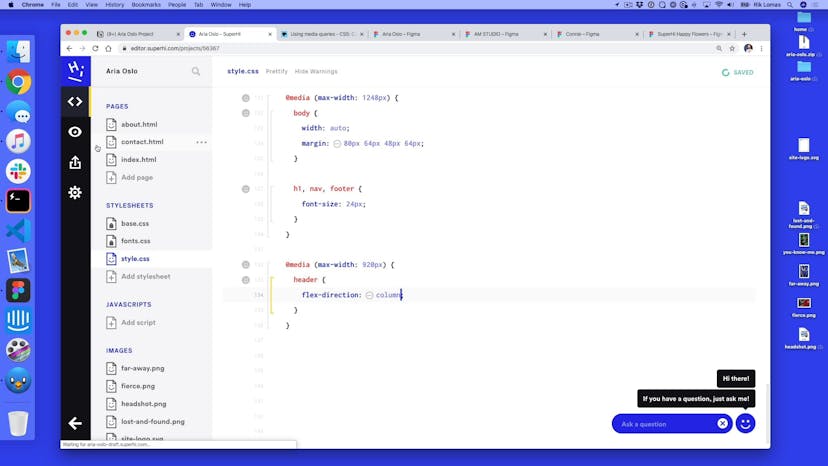
I wanna reduce that down. So what I'm gonna do in my media query is override these, so how do I do that? Now in my media query currently I've got one style in here. I've got one box inside my box, my media query box. What I can do, just like with HTML and just like with Figma, I can add more things to this group. To add more things to this group. What we gonna do is just add some more space below it. We're still within this yellow box of course, because we wanna do this just at this size, but what we wanna overwrite here is the h1,nav,footer and what do we wanna change? While we wanna do something to all of those, we can use curly brackets.

01:31

Open this up and we're gonna change the font size. What do you wanna change it to? Well, we could design this in Figma. We could just do a smaller version here. I'm just gonna do it in browser. So I'm doing some design in browser rather than design in Figma. So again, I like to use the eight point scale, so something like maybe 32 let's see how that looks. So again, what we'll see now is when we scroll us down, notice it flick into position.

01:59

This kinda feels pretty good. Maybe I wanna make it a little bit smaller. So maybe not 32 maybe down to 24 maybe. Let's see how this looks. 24,does that look pretty good? So there's large size and it pops down. There we go. So I'm pretty happy with this. Maybe what I want to do is start to change this header and these styles when I get a little bit smaller. So here when I get to around about 920, maybe 900.

02:26

I might wanna change the header completely. I might wanna change this layout. So what we're gonna work on next is we're gonna change this header using the different media query.

Private notes

A place for you to post notes about anything on this page. Only you can view your notes.

SuperHi FM

Want some ambient music in the background? Play our radio station!
Feeling stuck?

Don’t worry, we are here to help you with:

  • Speedy help from one of our team members
  • Detailed, relevant solutions
  • Direct access to peer support through Discord!

Remember, there’s no such thing as a silly question, so don’t hesitate to reach out, we love hearing from you!